Maple Mono
Free & open source ↗Rounded letterforms for comfortable reading.
$ cruxconst ready = true;if (ready != null) { code => ship(code);}0O 1lI -> => != <=
Download font ↗ crux十字星
Install Crux, follow the first-run Setup prompts, and start working.
Browse RC1 downloads ↗RC1 is a release candidate. This command pins the version instead of relying on latest. The installer downloads a precompiled package for your platform; Dart is not required.
Choose the platform where you want to install Crux.
Paste and run the following command in your terminal.
View / download the installer ↗Your terminal renders every Crux interaction, diagram, and line of text. Rendering, input response, and font shapes and alignment all affect the experience. Take a minute to choose a terminal and font before you start.
We recommend Ghostty on macOS / Linux and Windows Terminal on Windows. Maple Mono and Fira Code are both free, open-source fonts under the SIL Open Font License 1.1. Install your chosen font, then select it in terminal settings; installation alone does not switch the font.
A native interface for a fluid terminal workbench.
Official download ↗
A modern terminal experience on Windows.
Official download ↗The same sample is rendered in each font. Compare letterforms, ligatures, and 0 / O, 1 / l / I.
Rounded letterforms for comfortable reading.
Clear letterforms and ligatures for reading code.
After installing, select the font in your terminal settings. These previews show Latin characters and code glyphs.
On first launch, crux opens Setup automatically. Follow the on-screen prompts to get ready.
crux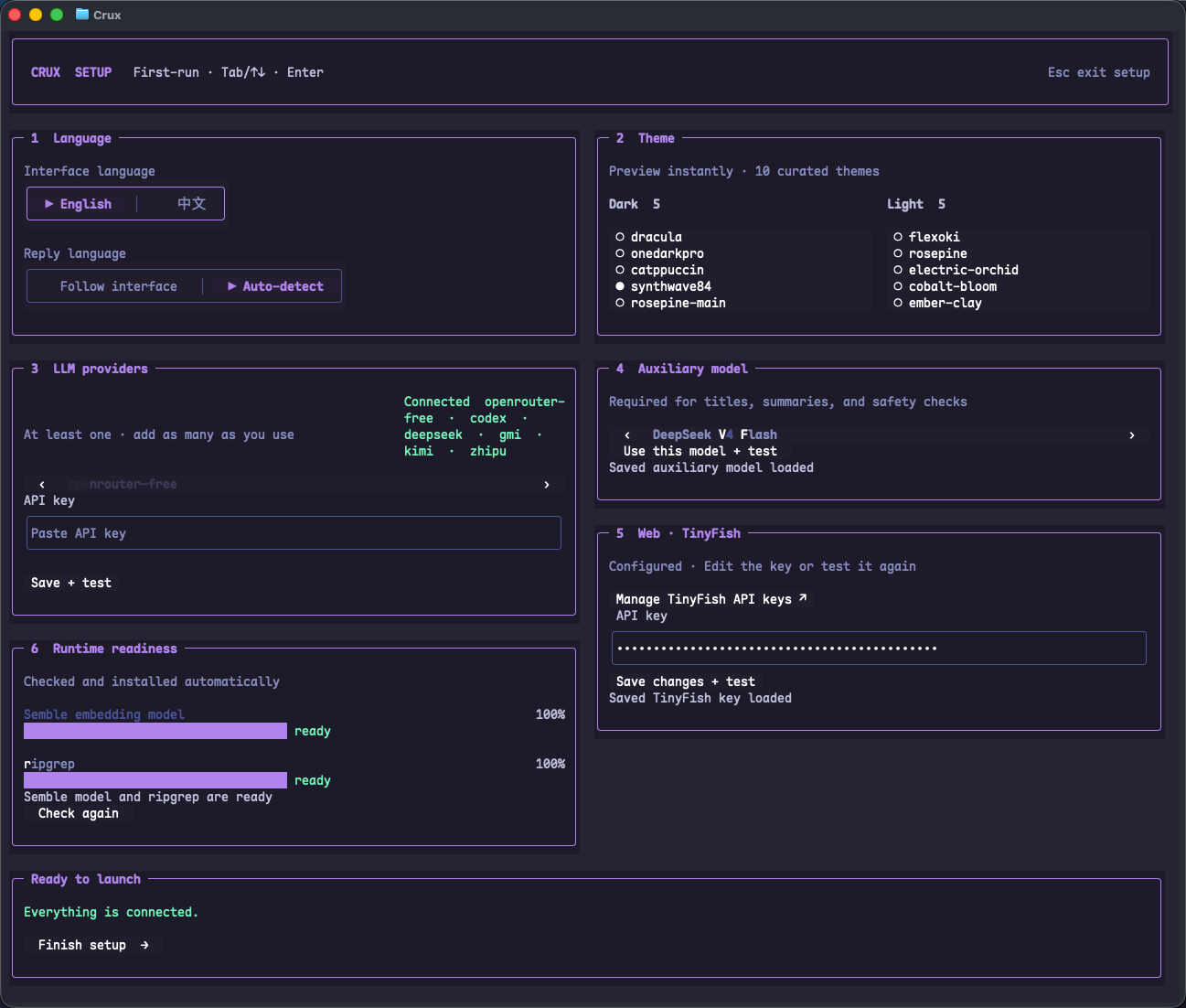
Once every card is verified and the runtime is ready, select Finish setup to enter the workbench. If a step fails, follow the message on that card and test it again.
To change your configuration later, select setup in the Home Settings area, or enter /setup in the Crux input box to reopen the guide.
Change to your working directory with cd, then run crux. Or launch Crux from anywhere and use the project switcher (/project) to open a regular project.
cd /path/to/your/project
cruxQuit Crux, then run the following in bash to remove the default installation and its bundled resources. For a custom installation, remove that directory instead.
Remove the Crux path added during installation from your shell configuration or Windows user PATH, then reopen the terminal. Configuration and session data are retained.
rm -rf "$HOME/.crux/bin"